"Can I share my whole library with my partner?" has been one of the most frequent questions we get. Google Photos has Partner Sharing. Apple has iCloud Shared Photo Library. Both are convenient, but neither is end-to-end encrypted by default. Our users have asked for the same convenience without giving up that guarantee.
Until now, the closest you could get in Ente was selecting multiple albums and sharing them in one batch. It worked, but it was still manual, and it wouldn't include albums you created later.
Today we're introducing Library Sharing: share all the albums you own with a family member in one go, and optionally keep sharing new albums automatically as you create them. All of it end-to-end encrypted, like everything else in Ente.
How it works
Head to Settings → Family, pick a family member, and tap Share albums.
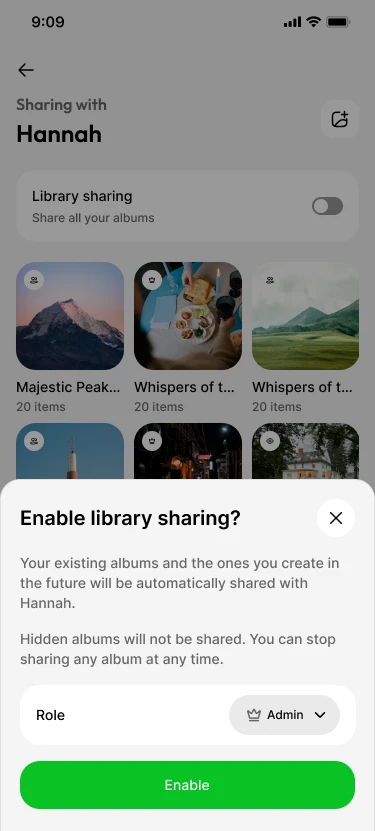 From there you can:
- Share everything at once. Select all the albums you own (or just some) and share them in a single action.
- Choose what they can do. Assign Viewer, Collaborator, or Admin per album, or use one default role across your selection.
- Turn on automatic sharing. Enable Library Sharing for a family member, and every album you create in the future is shared with them automatically. No more "oh, I forgot to share the trip album."
Your family member sees the albums appear as shared albums in their app, and new photos you add show up for them as your photos back up. This is the same live sharing Ente albums have always had.
Sharing everything, without oversharing
A feature that shares everything needs to be careful about what "everything" means. Library Sharing is built to respect your intent:
- Hidden albums are skipped. Albums that are hidden when Library Sharing runs are excluded from automatic sharing.
- Your removals are remembered. If you stop sharing an album, or your family member leaves it, automatic sharing won't quietly add it back. This is enforced by the server, not just by your app.
- You stay in control. You can stop sharing any album at any time, change roles later, or disable automatic sharing entirely. Disabling it keeps your existing shares intact; it just stops new albums from being added.
Tidy up, together
Sharing your library is also a way to share the work of keeping it in shape. The roles you assign decide how much your family can pitch in:
- Collaborators can add. Both sides of the family can land their photos in the same albums.
- Admins can help clean up. Make your partner an Admin, and they can remove photos from albums and suggest deletions for the duplicates and blurry shots. Suggestions land in your review queue, and nothing is deleted until you approve it.
- Everyone can react. Shared albums support comments and likes, end-to-end encrypted with the album, so the conversation about a photo lives with the photo.
Same encryption, more convenience
Convenience features often weaken end-to-end encryption. Library Sharing does not.
Every album in Ente is encrypted with its own key. When you share your library, your device seals each album's key to your family member's public key and sends the sealed keys, along with the metadata needed to establish each share, to our servers in batches. Our servers can establish the shares but cannot decrypt the album keys or your photos. Only your family member's devices, which hold their private key, can.
Your Library Sharing preferences are stored as end-to-end encrypted data and synced across your devices. Enable Library Sharing on your phone, and your other devices pick up the preference when they sync.
In short: we added partner sharing without giving Ente access to your photos.
Family first
Library Sharing is launching for family plans. Every paid plan lets you add up to five family members at no extra cost, with storage shared from your plan, which makes families the natural place for whole-library sharing to start. Shared albums don't count twice: each photo counts only against the storage of the person who uploaded it.
We'd love to hear how you use it, and where you'd like it to go next.
Availability
Library Sharing is rolling out now in Ente Photos on iOS and Android. Make sure you're on the latest version. Support on web and desktop is on the way.
And as always, all of this is open source: the client and the server, including everything described above. Self-hosters can use Library Sharing with the latest release of our server.
Ente Photos is an end-to-end encrypted home for your photos. If your family values privacy, give it a try.